Oracle Hyperion Financial Management, Fusion Edition 11.1.2.4.000.4847

CAUSE OF ERROR

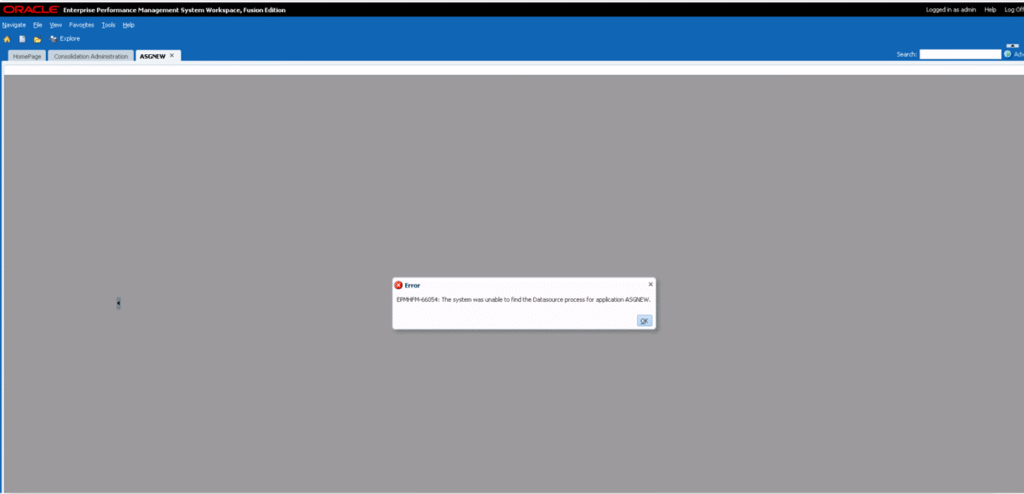
After Application creation i got an error in HFM.  “EPMHFM-66054 the system was unable to find the datasource process for application”
1) First i created demo sample application in HFM.
2) Then Open the application i got the below error.
EPMHFM-66054
1) I verify all the associated application status, were Active mode in Oracle Weblogic.
Check:  Go > http://servername:7001/console. Under deployment section find out the application.
 
2) Listener was active. Go > Run > cmd > lsnrctl status > should be ok.
 
3) Go > Cmd > “tnsping <service>” response should be ok.
 
But still got same error.
 
My Solution:
 
Phase 1
 
1) Stop all hyperion services.
 
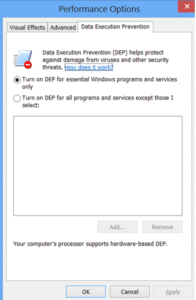
2) go to my computer > right click > properties > Advance System setting >  Advance > Under Performance >  Setting > Data Execution Prevention >  Should be Turn On.
EPMHFM-66054
Phase 2
 
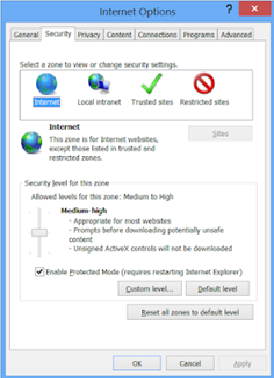
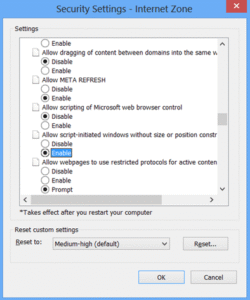
Go to Internet Explore > Tools > Internet Option > Security Tab > There are four option > Under Select Zone Click on Internet Icon > Custom Level > 
Phase 2
 
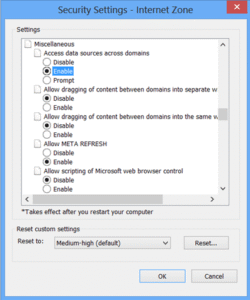
Under Security Settings > Under Miscellaneous > Enable “Access data sources across domains”
Oracle Hyperion

Then enable “Allow scrip-initiated windows without size or position constraints”, then press ok.
Oracle Hyperion

After that start all relevant services again then check it. My problem was resolved.